

Vibe Coding
Introduction
In a previous article I was comparing Antropic's Claude Sonnet 4.6 to DeepSeek-v4-flash for coding a small CLI utility. You can find the results here. The conclusion at the time was that Claude gave the better results over DeepSeek.
So while the code quality was much better, the downside is that Claude is way more expensive than DeepSeek. And while the results from Claude were much better, DeepSeek is indeed able to get the job done. Even with Antropic's PRO subscription I frequently hit the account's quota limits.
For my next experiment I wanted to fully lean-in to a full vibe coding experience using Claude Code, but switching to DeepSeek v4 Pro which was recently released and claims to significantly close the gap with other leading models. While more expensive than DeekSeek-v4-flash, it is still much cheaper than Antropic's Claude.

Leaf
For this experiment, I have a simple PHP Wiki application that I use to write my Blog articles. This works quite well but I have been meaning to update it for quite a while to add a fully off-line mode. Since it is a PHP application, it really needs the server to work. So for this update I wanted:
- Switch to an off-line first SPA design.
- Thin PHP backend, essentially serving the articles but rendering is delegated to the SPA.
- Most of the functionality of the Wiki provided by the SPA.
While still small, a project of this size and complexity would complete exceed the token context. This is particularly frustrating because you could give the AI the prompt to create the application, and the AI would happily comply and build something. However, you will soon realise that what was build doesn't work. It would either not work outright or mostly work but have a ton of bugs.
Architecture
As you can see we are following a basic Model-View-Controller (MVC) architecture, with the Model essentially containing a Data layer of an internal DB and a sync module, which is paired with the PHP server with sync and auth with an interchangeable backend storage.
The PHP server can support different storage implementation as well as different user validation. Currently we are using a simple flat file storage backend, but in the future we should be able to support a MySQL backend and git repository backends.
Similar we should be able to replace the user authentication.
On the frontend, we would use CodeMirror for editing
which can gracefully downgrade to a textarea. With rendering
via markdown-it with a selection of extensions.
Because we are starting from an existing wiki application we have a somewhat clear idea on what we are trying to build. Initially I created a complete plan to feed to the AI as a prompt.
However, for an application of this size (despite being smaller than today's average application) the full spec completely overflows the token context, so this resulted in a non-working system.
The approach that I took was to create an initial specification that was essentially an skeleton of the target application and have AI build that. So the initial skeleton was just the PHP backend with sync and auth functionality, and the frontend, with IndexedDB, sync client, a simple textarea view, and a list of notes for navigation.
Also, along with this, we specified a test strategy covering both the PHP backend and the SPA frontend.
The testing suite is critical for any project, and doubly so for vibe coding projects. Creating the test suite is relatively easy, as the actual coding is done by the AI, i.e mostly automated. But after having the test suite, we can start doing our incremental changes in a rather safe and consistent pace.
Incremental changes

Afterwards I would then ask the AI to modify the code. For repeatability I would first chat with the AI on what to implement and then save the plan into a file. Later I would simply chat with the AI and after making the change tell it to describe the changes into a file.
I though writing the plan to a file would let me chat about the change so I would know what exactly would be implemented, also, if we run out of Token Context, we would still have the plan on file to execute. In practice, implementation plans were not as ironclad as I hoped. Sometimes the AI would still introduce bugs, or things that I initially thought would work did not work in practice. Also, the implementation plans that the AI was generating was very detailed (down to actual code snippets to insert).
So at the end, it seemed to be more effective to simply chat and implement interactively. In pre-planning and interactively implementing the AI was generating code at the same level of detail.
For this to work, however, it is important to use a version control system (i.e. git), so we can revert to previous version in case the direction of the chat doesn't work out. Equally important is to keep an eye on the token usage, not so much for the costs but to keep within the token context.
Creating and maintaining a backlog helps in keeping the development on track. Since we need to keep the change increments in am level that is manageable by the AI.
Like I mentioned earlier, creating a test suite is super important, as we can make changes knowing that we are not introducing regressions with each improvement. Also, testing each change before moving to the next is quite useful in solving any bugs that are invariably introduced by each change. Even with incremental changes the AI can introduce bugs.
Another thing I found is that the AI can be quite inconsistent in the way it does things. For example, in JavaScript/TypeScript you need to do:
item = document.getElementById(id);Very often this frequent line of code is abreviated, but I found that the AI would use:
$(id)
getElem(id)
document.getElementById(id)
Event with a CLAUDE.md file, sometimes it would apply different
shortcuts in different files. This probably has to do with
the fact that most LLMs do introduce a certain level of randomness
in its inferred responses.
Another related thing is that it would tend to repeat patterns very often rather than encapsulate repeated snippets into a function and reuse it. This is probably do to the incremental changes, sometimes a later change would require a similar pattern but the AI would simply rewrite the same pattern (probably in a different file).
A way to mitigate this is to do frequent refactoring. Tell the AI to review the code and examine for patterns or analyze it with different criteria.
One interesting issue pop-up while trying to size CodeMirror within the displayed window. By default the area created for CodeMirror is too small. I wanted to have it consume as much of the available window as possible. I prompted DeepSeek to adjust this, but despite trying different things, DeepSeek was not able to solve this. I went to Claude Chat website and explained the issue, and Claude Chat came with right solution on the first try.
I find AI in general weak at "creative" problem solving and taking different solution patterns and applying them at alternative problem scenarios. For example, I would describe a solution, and the AI would chat that this can not be solved, but while chatting I would sometimes would point out, but you can do this, and the AI would go, "Oh, yeah, that would work!".
Similarly, I would find segments of code that while workable would not be the best approach in my opinion. Once again, being able to keep an eye on the changes that the AI is proposing is quite important.
Test Suites
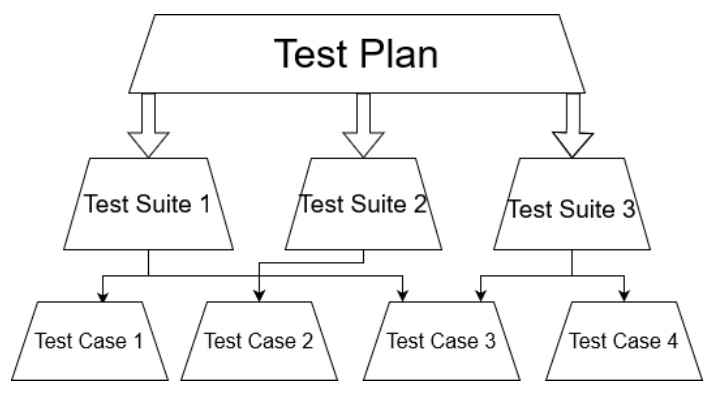
As I mentioned earlier, test suites are critical in this development process. I can not emphasise this more.
Personally, I find writing test suites a very non-rewarding process. However, with AI, it is just a matter of telling the AI agent to create a test suite for an implemented feature. There is no real reason, not to create tests. With this, we can incrementally improve the code base and be able to detect regressions timely.
Considering how prone are today's LLMs to hallucinations and enthusiastically proposing broken solution, test suites are a good way to detect this issues before they become a real problem.
What is the Vibe
Overall, I found the Code Vibing experience a positive one. It felt like coding with a helpful assistant.
The idea that AI brings the experience, the people brings the opportunities is very true. This is obvious, an AI will not start doing things on their own, but requires people initiate the first prompt. But even while Vibe coding this application, we would be making incremental improvements. So the AI would implement the same thing multiple times. Rather than coming with "Wait a minute" we have done this multiple times, maybe we should make it a reusable component, it would happily do what is essentially copy paste of the code. This is despite the fact that the AI is able to recognise the code duplication. If later I would ask the AI to effectively check for this it would come up with these suggestions. Ironically enough, at least Claude Code would inspect your code base to make sure that it understand the style used to write the code. While this is a good thing, because you want to enforce coding standards. In this case, the AI will find the code repetition and assume that is the style of the code we are using and keep repeating things even more. Yes, the AI brings the expertise, you still need to provide the ideas.
Another nice aspect is that it felt like programming with a fairly knowledgeable assistant. It would happily take care of updating documentation, updating test suites, writing scaffolding, etc. In brings to the hello world example. In Python hello world reduces to:
print('Hello world');
I asked Claude to write it in Java, note that I asked it to support multiple languages, something that you would expect in today's global world:
package com.helloworld;

import com.helloworld.i18n.LanguageManager;

import javax.swing.*;
import javax.swing.border.EmptyBorder;
import java.awt.*;
import java.awt.event.*;
import java.awt.geom.*;
import java.util.Locale;

public class HelloWorldApp extends JFrame {

    private final LanguageManager langManager;
    private JLabel greetingLabel;
    private JLabel subtitleLabel;
    private JLabel languageLabel;
    private JComboBox<String> languageCombo;

    private static final String[] LANG_CODES = {"en", "es", "nl"};

    public HelloWorldApp() {
        langManager = new LanguageManager(Locale.ENGLISH);
        initUI();
    }

    private void initUI() {
        setDefaultCloseOperation(EXIT_ON_CLOSE);
        setSize(640, 420);
        setLocationRelativeTo(null);
        setResizable(false);
        setTitle(langManager.get("window.title"));

        GreetingPanel contentPane = new GreetingPanel();
        contentPane.setLayout(new BorderLayout());
        setContentPane(contentPane);

        JPanel card = new JPanel();
        card.setOpaque(false);
        card.setLayout(new BoxLayout(card, BoxLayout.Y_AXIS));
        card.setBorder(new EmptyBorder(60, 60, 40, 60));

        greetingLabel = new JLabel(langManager.get("greeting"), SwingConstants.CENTER);
        greetingLabel.setFont(new Font("Serif", Font.BOLD, 72));
        greetingLabel.setForeground(new Color(0xFFF8F0));
        greetingLabel.setAlignmentX(Component.CENTER_ALIGNMENT);

        subtitleLabel = new JLabel(langManager.get("subtitle"), SwingConstants.CENTER);
        subtitleLabel.setFont(new Font("Serif", Font.ITALIC, 16));
        subtitleLabel.setForeground(new Color(0xFFD9B0));
        subtitleLabel.setAlignmentX(Component.CENTER_ALIGNMENT);

        card.add(greetingLabel);
        card.add(Box.createVerticalStrut(12));
        card.add(subtitleLabel);
        card.add(Box.createVerticalGlue());

        contentPane.add(card, BorderLayout.CENTER);
        contentPane.add(buildSelectorRow(), BorderLayout.SOUTH);
    }

    private JPanel buildSelectorRow() {
        JPanel row = new JPanel(new FlowLayout(FlowLayout.CENTER, 10, 16));
        row.setOpaque(false);

        languageLabel = new JLabel(langManager.get("language.label"));
        languageLabel.setForeground(new Color(0xFFEDD8));
        languageLabel.setFont(new Font("SansSerif", Font.BOLD, 14));

        String[] names = {
            langManager.get("language.english"),
            langManager.get("language.spanish"),
            langManager.get("language.dutch")
        };
        languageCombo = new JComboBox<>(names);
        languageCombo.setFont(new Font("SansSerif", Font.PLAIN, 14));
        languageCombo.setPreferredSize(new Dimension(160, 32));
        languageCombo.setFocusable(false);

        languageCombo.addActionListener(e -> {
            int idx = languageCombo.getSelectedIndex();
            Locale locale = switch (LANG_CODES[idx]) {
                case "es" -> new Locale("es");
                case "nl" -> new Locale("nl");
                default   -> Locale.ENGLISH;
            };
            langManager.setLocale(locale);
            refreshUI();
        });

        row.add(languageLabel);
        row.add(languageCombo);
        return row;
    }

    private void refreshUI() {
        setTitle(langManager.get("window.title"));
        greetingLabel.setText(langManager.get("greeting"));
        subtitleLabel.setText(langManager.get("subtitle"));
        languageLabel.setText(langManager.get("language.label"));

        // Swap combo labels without re-firing the listener
        ActionListener[] listeners = languageCombo.getActionListeners();
        for (ActionListener l : listeners) languageCombo.removeActionListener(l);
        int sel = languageCombo.getSelectedIndex();
        languageCombo.removeAllItems();
        languageCombo.addItem(langManager.get("language.english"));
        languageCombo.addItem(langManager.get("language.spanish"));
        languageCombo.addItem(langManager.get("language.dutch"));
        languageCombo.setSelectedIndex(sel);
        for (ActionListener l : listeners) languageCombo.addActionListener(l);

        repaint();
    }

    // Custom panel with gradient + soft orb background
    static class GreetingPanel extends JPanel {
        GreetingPanel() { setOpaque(true); }

        @Override
        protected void paintComponent(Graphics g) {
            super.paintComponent(g);
            Graphics2D g2 = (Graphics2D) g.create();
            g2.setRenderingHint(RenderingHints.KEY_ANTIALIASING, RenderingHints.VALUE_ANTIALIAS_ON);

            int w = getWidth(), h = getHeight();

            // Deep purple gradient background
            g2.setPaint(new GradientPaint(0, 0, new Color(0x1A1040), 0, h, new Color(0x4B1248)));
            g2.fillRect(0, 0, w, h);

            // Warm orange orb (bottom-left)
            g2.setPaint(new RadialGradientPaint(
                new Point2D.Float(w * 0.15f, h * 0.85f), w * 0.45f,
                new float[]{0f, 1f},
                new Color[]{new Color(224, 90, 48, 160), new Color(224, 90, 48, 0)}
            ));
            g2.fillOval((int)(w * -0.15), (int)(h * 0.40), (int)(w * 0.65), (int)(h * 0.90));

            // Violet orb (top-right)
            g2.setPaint(new RadialGradientPaint(
                new Point2D.Float(w * 0.88f, h * 0.18f), w * 0.42f,
                new float[]{0f, 1f},
                new Color[]{new Color(139, 47, 201, 160), new Color(139, 47, 201, 0)}
            ));
            g2.fillOval((int)(w * 0.55), (int)(h * -0.20), (int)(w * 0.65), (int)(h * 0.75));

            g2.dispose();
        }
    }

    public static void main(String[] args) {
        try {
            UIManager.setLookAndFeel(UIManager.getSystemLookAndFeelClassName());
        } catch (Exception ignored) {}

        SwingUtilities.invokeLater(() -> new HelloWorldApp().setVisible(true));
    }
}
As you can see, over 100 lines of code, but all boiler plate that is generated by the AI.
Another interesting thing I noticed, is that the AI seems to have a bias for self-building rather than re-using existing off-the-shelf components. This is not bad in itself but yields to a lot of of custom code that could have benefit from simply using a library.
When I finished the application, I realized that it would hav benefit significantly from using [React.js][rjs] framework with some pre-canned UI elements. I asked the AI to re-factor into a [React.js][rjs]. The re-factor was already too big and broke things.
Guardrails

Just before I started this, I wanted to do a small PDF editing
job on a document I downloaded. Because I was feeling lazy
and did not want to search for the documentation on how to do
it I used Claude Code to edit the file which was in my
Downloads folder. Claude Code helpfully deleted all
my files in the Downloads folder because they were not
relevant to the task at hand. Luckily, it was only my
Downloads folder so it wasn't anything that I would really
miss. But illustrate the point that you have to be careful
with using AI. Specially if Claude Code gets access
to the filesystem. When using a coding agent, make sure
it only gets access to the folder where the project is
located. Using git in the project folder is also
important so that you can always go back to previous revision
of the code.
While a lot of the work done by programmers can be done by AIs, given current technology, Software Engineering knowledge is still relevant. Because AIs today are not able to code a large modern application, you can use the same tools that you would normally use in large Application development to manage projects and their complexity:
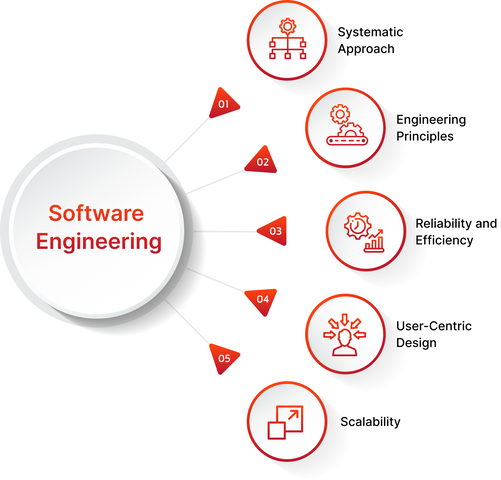
- Code Architecture & Organization
- Microservices Architecture: Dividing an application into small, independent services that communicate via APIs, allowing separate teams to develop different features simultaneously.
- Monolith-to-Microservices / Modular Monoliths: Designing a single codebase with highly isolated, independent modules to keep development clean before choosing to split into microservices.
- Domain-Driven Design (DDD): Aligning the software's structure and coding language directly with the business domain it represents.
- Component-Driven Development: Developing user interfaces by building isolated, reusable components (common in modern frontend development).
- Design Principles and Code Quality
- SOLID Principles: A framework of five design principles aimed at making software designs more understandable, flexible, and maintainable over time.
- Design Patterns: Standardized, reusable solutions to common coding problems (such as the Factory, Strategy, or Observer patterns).
- Separation of Concerns (SoC): The practice of distinct sections of code addressing distinct features or behaviors, ensuring features don't tightly intertwine and break one another.
- Data & State Management
- CQRS (Command Query Responsibility Segregation): Separating the data mutation operations (commands) from the data reading operations (queries) to optimize complex development and data flow.
- Event Sourcing: Ensuring that all changes to an application state are stored as a sequence of events, rather than just updating a single row in a database.
- State Management Patterns: Centralizing the "source of truth" for application data (using patterns like Redux or Flux) to prevent unpredictable behavior across large codebases.
- API & Integration Development
- API First Design: Developing the application's application programming interfaces (APIs) before writing the underlying business logic, allowing parallel development across teams.
- Micro-Frontends: Applying the microservices philosophy to the frontend, allowing independent teams to develop separate parts of the user interface.
All these practices useful for doing development by multiple teams can be applied in Vibe Coding. The difference being that instead of multiple teams you have multiple AI Coding Sessions.
I think at some point we would have multiple AI agents taking different roles, i.e Software Developer, Testing Engineer, Software Architect. Each AI agent has its own area of concern, and we would have a Project Manager AI agent managing and coordinating all activities. However, this only solves the token context limitation. At the end of the day, AIs are still AIs, and they need a first prompt to get started.
Conclusion

These are the areas where I found Vibe Coding most helpful:
- People bring the opportunities, the AI brings the expertise.
- Code assist for Documentation, Testing, Static code analysis and Boiler plate scaffolding.
- Summarize and understand the code, chat with the code.