

T-Curl

Last time we were exploring using Temporary Agency Tokens in a ECS VM to grant priviledges to a VM and issue Let's Encrypt DNS-01 handshakes.
This was using a very primitive curler script. Out of that initial idea, I wrote t-curl. t-curl is simple project that can be used for writing scripts to automate T-Cloud Public operations.
It is meant to be usable with shell and python scripts as well supporting TerraForm T-Cloud Public provider authentication.
The script itself has low requirements. It mainly depends on
the python requests module and optionally pyyaml and urwid
for interactive logins.
There are two scripts provided:
- tcurl - main script
- tcurl_login - login interface
For scripting, the script support bearer tokens, AK/SK credentials (SDK-HMAC-SHA256), and AWS S3 v4 signatures.
Using Temporary Agency Tokens
To retrieve temporary agency tokens from the T Cloud Public metadata server you can do:
Shell
eval $(tcurl metadata -f shell)This will retrieve the temporary agency token and store them in the environment as:
export OS_ACCESS_KEY=XXXXXXXXXXXXX
export OS_SECRET_KEY=XXXXXXXXXXXXXXXXXXXXXXXXXXXXXXXXXX
export OS_SECURITY_TOKEN=XXXXXXXXXXXXXXXXXXXXXXXXXXXXXXXXXXX
export OS_AKSK_EXPIRES_AT=YYYY-MM-DDTHH:MM:SSZ
Subsequent calls to tcurl will simply get the configuration
from the environment. Alternatively, you can feed this directly
as command line arguments.
Python
import tcurl

aksk = tcurl.metadata()
This will return a dictionary with the following:
aksk = {
  'access': 'XXXXXXXXXXXXX',
  'secret': 'XXXXXXXXXXXXXXXXXXXXXXXXXXXXXXXXXX',
  'securitytoken': 'XXXXXXXXXXXXXXXXXXXXXXXXXXXXXXXXXXX',
  'expires_at': 'YYYY-MM-DDTHH:MM:SSZ',
}
Obtaining tokens
You can also issue unscoped and scoped tokens aswell as temporary AK/SK credentials from username and password.
Shell
For example, to issue a unscoped token using command line arguments:
tcurl login --region eu-nl --username XXXXXX --password XXXXX --totp XXXXX --domain XXXXX --format shellWhere:
--regionis an optional region. If not specified defaults toeu-de.--usernameyour tenant user's name--passwordpassword--totponly needed if the user has virtual MFA enabled.--domainYour tenant's name usually starts withOTP00000XXXX
If succesful it will output:
export OS_AUTH_TOKEN=XXXXXXXXXXXXXXXXXXXXXXXXXXXXXXXXXXXXXXXXXXXx
export OS_AUTH_EXPIRES=YYYY-MM-DDTHH:MM:SSZ
export OS_AUTH_DOMAIN_ID=XXXXXXXXXXXXXXXXXXXXXX
Alternatively you can login as follows:
export OS_PROJECT_NAME=XXXXXXX
export OS_USERNAME=XXXXXXXXXX
export OS_PASSWORD=XXXXXXXXXXXX
export OS_USER_DOMAIN_NAME=XXXXXXXXXXXXXXXXXXXXXXXX
eval $(tcurl login --format shell)
This will automatically issue a token scoped to OS_PROJECT_NAME.
You can then issue tcurl calls directly.
Python
In python this can be done with:
token, details = tcurl.login(
    project = 'XXXXXXXXXXXXX',
    username = 'XXXXXXXXXXXXXXXX',
    password = 'XXXXXXXXXXXXXXXXXXXXX',
    domain = 'OTP000XXXXXXXXXXXXXx',
    totp = 'Optional passcode',
)
You can then use token in your requests calls.
Issuing temp AK/SK
If you need to access OBS/S3 Compatible APIs you can convert your token into temporary AK/SK credentials:
Shell
export OS_REGION=eu-de
export OS_AUTH_TOKEN=XXXXXXXXXXXXXXXXXXXXXXXX
eval $(tcurl aksk --format shell)
Python
To do the same in Python:
aksk = tcurl.temp_aksk(
    region = 'eu-nl',
    token = 'XXXXXXXXXXXXXXXXXXXXXXXXXXXXXXXXXXXXXXXXXXXXXXXXXXXXXXx',
)
aksk is then a dictionary with:
{
  'access': 'XXXXXXXXXXXXXXXXXX',
  'secret': 'XXXXXXXXXXXXXXXXXX',
  'securitytoken': 'XXXXXXXXXXXXXXXXXXXXXXXXXXXXXXXXXXXXXXXXXXXXXXXX',
  'expires_at': '2026-02-12T00:23:31Z',
}
tcurl_login
If you want a more user friendly user interface you can use tcurl-login script:
eval $(tcurl-login --tcurl tcurl.py --format shell)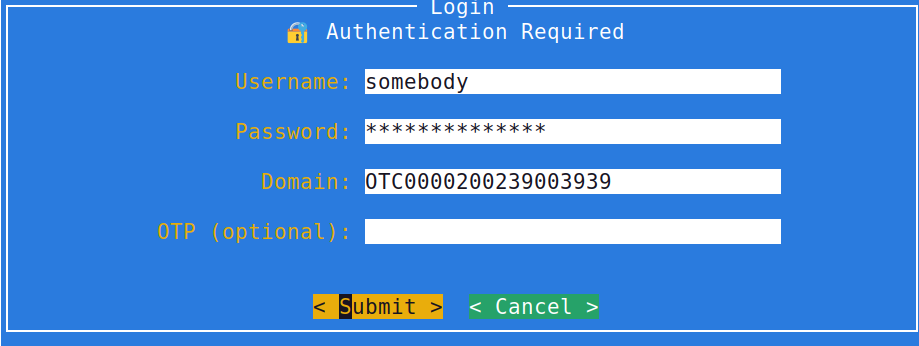
Terraform
You can use the tcurl-login, login or login+aksk functions
to set-up a Terraform provider. The T Cloud Public's official
terraform can configure from environment variables. tcurl
exports the environment variables so they can be directly usable
by the terraform provider. So you can simply configure in
your providers.tf the following:
# Provider configuration
terraform {
  required_version = ">= 1.6.0"
  required_providers {
    opentelekomcloud = {
      source  = "opentelekomcloud/opentelekomcloud"
      version = ">= 1.35.0"
    }
  }

  # Comment out if this is not needed.
  backend "s3" {}
}

# Bare provider configurations
provider "opentelekomcloud" {}
If you are using the S3 compatible backend (to store state), you would
need to set up some environment variables as well as a backend.hcl
configuration file.
Environment variables:
export AWS_ACCESS_KEY_ID="$OS_ACCESS_KEY"
export AWS_SECRET_ACCESS_KEY="$OS_SECRET_KEY"
export AWS_SESSION_TOKEN="$OS_SECURITY_TOKEN"
With backend.hcl contents being:
#
# Configure S3 backend
#
bucket                      = "CHANGE_ME_BACKEND_BUCKET"
key                         = "CHANGE_METFSTATE_PATH"
region                      = "eu-de"
endpoint                    = "https://obs.eu-de.otc.t-systems.com"
skip_credentials_validation = true
skip_metadata_api_check     = true
skip_region_validation      = true
use_path_style              = true
use_lockfile                = true
Then you can call terraform init sub-command as follows:
tofu init -backend-config=backend.hcl
Making API calls
Shell
If you were using eval $(tcurl --format shell) you can simply call REST API calls
as follows:
tcurl GET \
    https://ecs.$project_region.otc.t-systems.com/v2/$project_id/servers \
    | jq .
This example assumes you have a scoped token.
If you are using temp AK/SK credentials you can:
tcurl GET \
    --project "$project_name" \
    https://ecs.$project_region.otc.t-systems.com/v2/$project_id/servers \
    | jq .
tcurl by default uses the environment variables (which are exported by the previous commands).
Python
Complete example using python and bearer scoped tokens:
import tcurl
import requests

# Retrieve bearer token -- scoped
token, details = tcurl.login(
    project = 'XXXXXXXXXXXXX',
    username = 'XXXXXXXXXXXXXXXX',
    password = 'XXXXXXXXXXXXXXXXXXXXX',
    domain = 'OTP000XXXXXXXXXXXXXx',
    totp = 'Optional passcode',
)
# prepare session authentication
xargs = tcurl.creds(token =token)
# make API call
resp = requests.get(f'https://ecs.{details["project"]["name"].split("_")[0]}.otc.t-systems.com/v2/{details["project"]["id"]}/servers',
            **xargs)
resp.raise_for_status()
print(resp.text())
Complete example using python and bearer unscoped tokens:
import tcurl
import requests

# Retrieve bearer token -- scoped
token, details = tcurl.login(
    region = 'eu-de',
    username = 'XXXXXXXXXXXXXXXX',
    password = 'XXXXXXXXXXXXXXXXXXXXX',
    domain = 'OTP000XXXXXXXXXXXXXx',
    totp = 'Optional passcode',
)
# prepare session authentication
xargs = tcurl.creds(token =token)
# make API call
resp = requests.get('https://tms.eu-de.otc.t-systems.com/v1.0/predefine_tags',
            **xargs)
resp.raise_for_status()
print(resp.text())
Example using metadata server credentials
import tcurl
import requests

# Get temp AK/SK credentials from metadata server
aksk = tcurl.metadata_config()
# Prepare for session
xargs = tcurl.creds(
      ak = aksk['access'],
      sk = aksk['secret'],
      securitytoken = aksk['securitytoken'],
    )
# Look-up project
project = 'eu-de_CHANGE_ME'
region = 'eu-de'
project_id = tcurl.project_lookup(project, xargs)
# Prepare project scope
tcurl.add_project_id(xargs, project_id)
# make API call
resp = requests.get(f'https://ecs.{region}.otc.t-systems.com/v2/{project_id}/servers',
            **xargs)
resp.raise_for_status()
print(resp.text())
Example using permanent AK/SK credentials and a global service
import tcurl
import requests

# Permanent AK/SK credentials
ak = 'ACCESS_KEY'
sk= 'SECRET_KEY'

# Prepare for session
xargs = tcurl.creds( ak = ak, sk = sk )
# Lookup domain
domain_id, _ = tcurl.ak_domain_lookup(ak, xargs)
# Prepare global scope
add_domain_id(xargs, domain_id)
# make API call
resp = requests.get('https://tms.eu-de.otc.t-systems.com/v1.0/predefine_tags',
            **xargs)
resp.raise_for_status()
print(resp.text())